Insights
What are Insights?
Insights help you gain an accurate and deep understanding of your data. It provides an in-depth and focused analysis of the performance of each key operational area of your business.
Why do we need Insights?
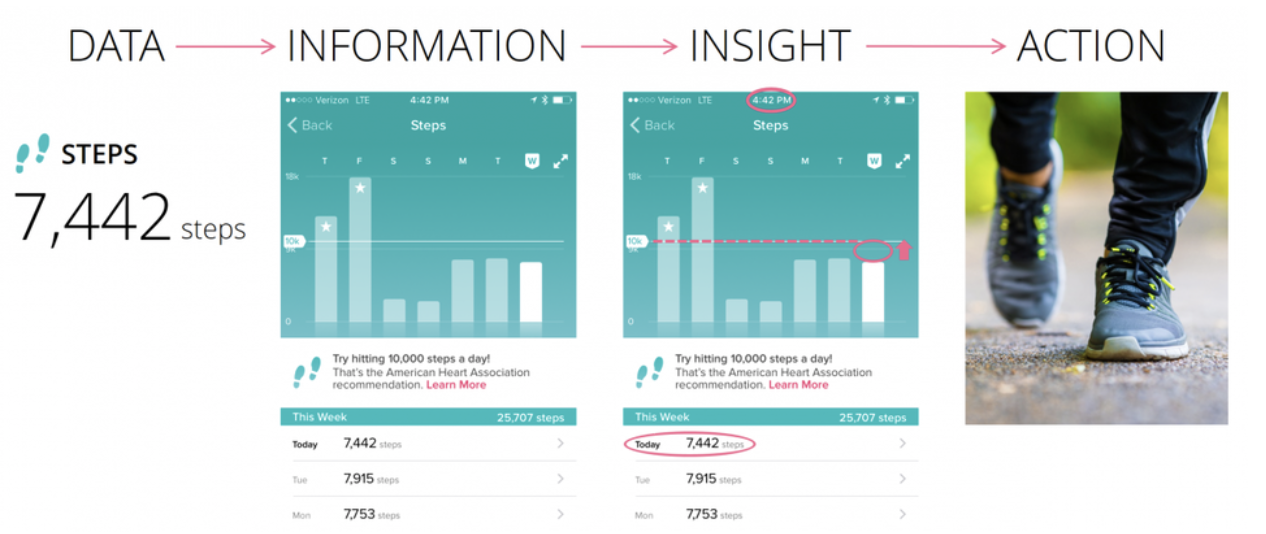
In today's accelerating pace of business, having clear visibility into operations is crucial. Many businesses use data to support their decisions instead of driving their actions through insights. But why? After all, data is only of great significance if you can translate it into actionable insights.
Your organization might be sitting on the world's largest data pile, but it's useless unless you have the means to translate it into insights that drive your business.
Insights are used for translating data into business value. Gaining these insights can help in boosting service levels and efficiency, by identifying opportunities for profit and growth within your business.
Where to find actionable Insights?
At Rockmetric, we provide machine learning-powered descriptive insights and analysis for improved business monitoring.
There are multiple ways in the platform through which we can get insights.
- By right-clicking on charts and tables and selecting the Auto Analysis option.
- Navigate to the Chart / Table Page.
- Right-click on a data-point, a menu appears.
- Select Auto Analysis from the menu.
- A new side-bar displaying insights and a small description box is displayed.
- Using the Search Bar
- Type questions in Natural Language in the search bar.
- Click on the search icon, it displays insight analysis of the question.
- Inside the Alfred Page.
- Navigate to the Alfred Page.
- Select the Insight Analysis tab.
- It displays a set of dynamic questions to view insight on.
- Click on the get insights icon.
- A new tab is opened displaying the insights of the question.
What kind of analysis do I get from Insights?
When insight is tied to business goals and strategies, it’s more likely to provide effective actions. It can address areas of your business and aims to provide immediate suggestions and key points. In the platform, you can get a summary, trend, comparison and other relationship between the data point and the most frequently accessed KPI and dimension value.
How can I improve Insights?
With the help of insight analysis and feedback, the user should rate an insight by clicking the like or dislike icon of the insight. With the help of this feedback, the insights are customized accordingly by the insight engine.
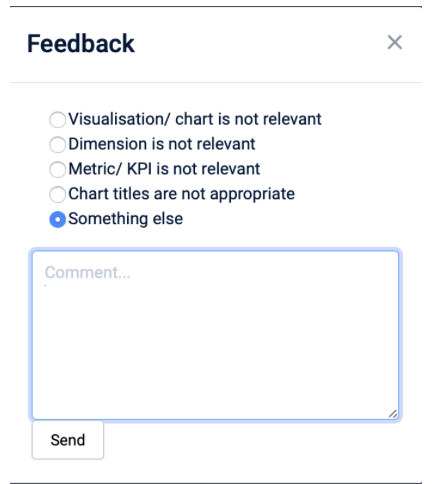
When you click dislike, you can provide more details on why you dislike the insight by selecting a list of options from the drop-down menu or write your own comments.